01 / EXECUTION
Make your entry.
BUY and SELL at market with the stop and target already attached, re-anchored to the real fill price so slippage does not shift them.
FEATURED PROJECT / NOW ON THE MQL5 MARKET
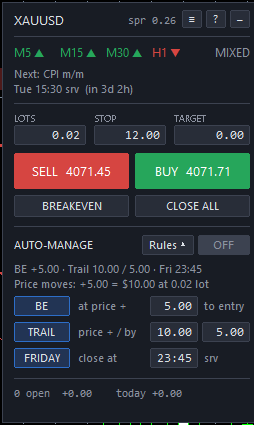
Meet Trend Trail Panel. See which way four timeframes are leaning, place your own trade with the stop attached, and let breakeven and a trailing stop manage the exit. Built around XAUUSD, now on the MetaTrader 5 Market.
01 / THE TOOLKIT
Bring order entry, position management and market context together. You choose the trade. The panel handles the workflow.
01 / EXECUTION
BUY and SELL at market with the stop and target already attached, re-anchored to the real fill price so slippage does not shift them.
02 / POSITION SIZING
Choose fixed lots, a cash risk amount, or a percentage of balance. Risk sizing uses the terminal’s own profit calculation, so it works for any symbol and account currency.
03 / MARKET CONTEXT
An EMA trend strip across M5, M15, M30 and H1, from closed bars only. The same EMAs are drawn on the chart, with an arrow where all four start to agree, plus tested supply and demand zones.
04 / ECONOMIC NEWS
Economic calendar windows can warn you about selected releases, or block panel entries around them.
05 / TRADE MANAGEMENT
Breakeven at a set profit, then a trailing stop, and an optional close before the weekend. Rule distances can be price moves or account money per trade.
06 / YOUR DECISION
Every entry is manual. Auto-manage starts off, only ever tightens stops, and never opens a trade. Settings you type on the panel are saved per symbol.
Features as of version 1.12, published on the MQL5 Market on 7 November 2026.
ON THE CHART / SCREENSHOTS
Version 1.12 on an XAUUSD M5 chart: the trend strip, the next news release, the order ticket and the auto-manage rules, with the EMA lines, alignment arrows and supply and demand zones behind the candles.
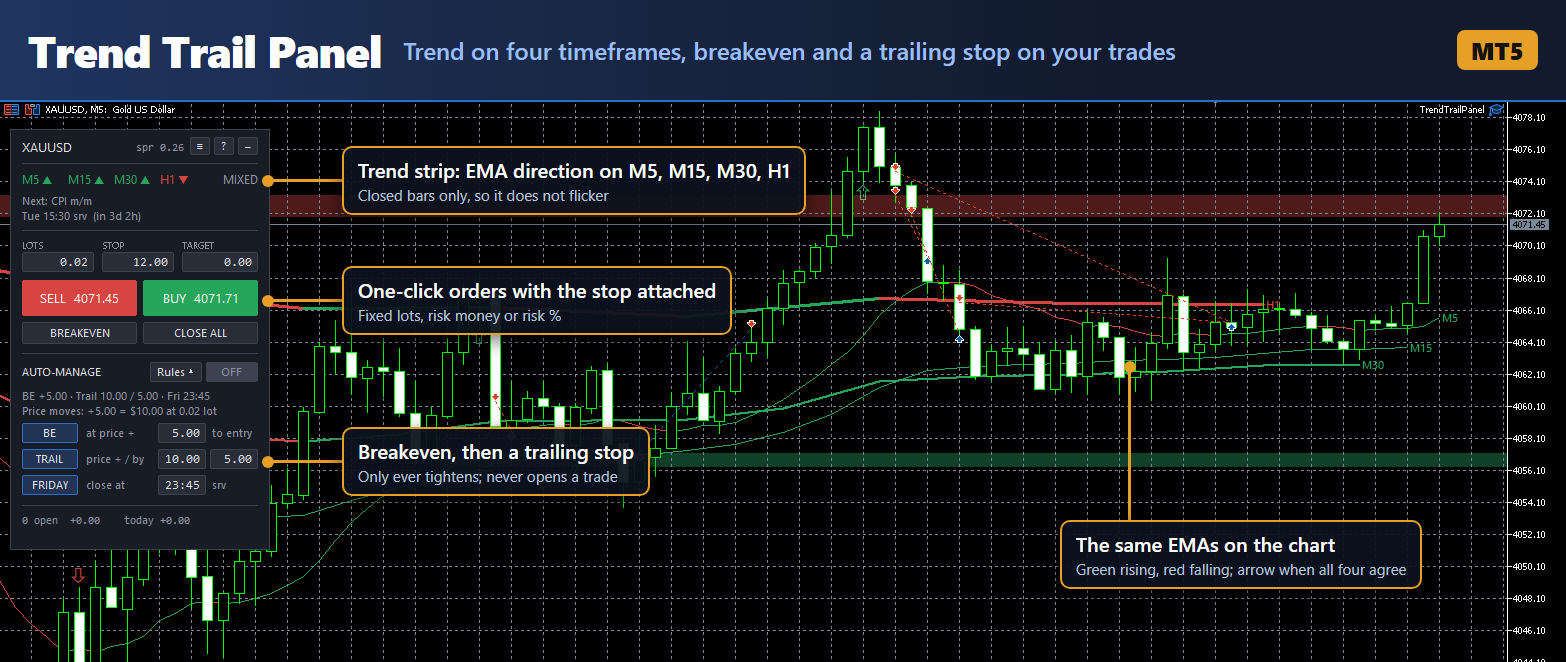
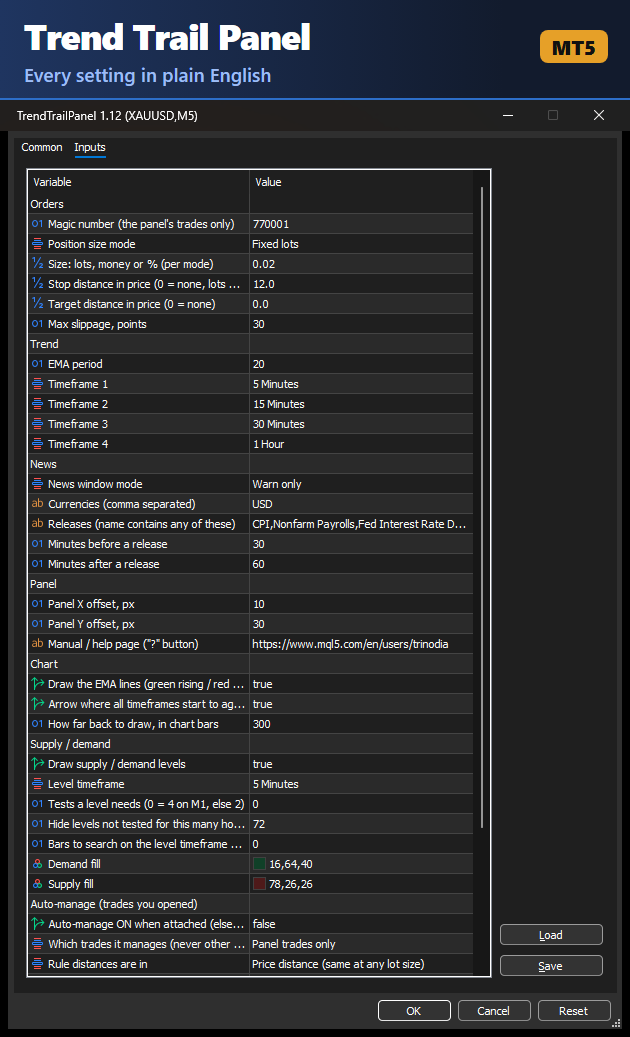
Screenshots from the live terminal. Prices shown are historical.
SUPPLY & DEMAND / CHART CONTEXT
Tested levels are drawn behind the candles: demand below price in green, supply above price in red. You still decide every entry.
Levels group repeated swing turns near the same price. Chart labels show the level timeframe, qualifying test count and, where applicable, “flipped”.
Two consecutive closes through a level’s break threshold can break it. A tested level can flip once, but only reappears after a qualifying retest from the new side. A second break removes it.
Explore the zones demo ↗Zones provide historical price context. They are not automatic entries or buy/sell signals. The browser demo uses generated prices; the MT5 EA uses its available chart history.
02 / KNOW YOUR PANEL
Select a field or button to explore what it does. This interactive HTML guide mirrors the panel’s layout, with explanations beside it.
EXPLORE THE INTERFACE
INTERACTIVE GUIDE · NO ORDERS ARE PLACED
SELECT A CONTROL TO LEARN MORE
The symbol is the chart instrument. The spread is the difference between its bid and ask prices, shown in price units.
XAUUSD is gold against the US dollar. The displayed spread is 0.26. Prices here are historical examples.
Click or tap a control, or use Tab and Enter. The arrows step through the guide.
The displayed values explain the interface, not recommended trading settings. Auto-management requires MT5 to remain open and connected.
04 / GETTING STARTED
Trend Trail Panel runs entirely inside MetaTrader 5 desktop on Windows or a Windows VPS. No separate server, no DLLs, no shared account password.
Buy it, or download the free demo, on the MQL5 Market page or in MT5 from the Toolbox’s Market tab. MT5 installs it under Navigator → Expert Advisors → Market.
Open your XAUUSD chart, drag Trend Trail Panel onto it, and tick Allow Algo Trading in the Common tab. Turn on Algo Trading in the MT5 toolbar too.
Choose your size, stop and target. Open the Calendar tab in the Toolbox once so the news data downloads. Check the trend strip and news line before placing your own entry.
Auto-manage starts off. The defaults are set for XAUUSD; set the stop and the rule distances for the symbol you trade before switching it on.
Markdown document · Updated 7 November 2026 for version 1.12.
The EA groups repeated swing turns into tested levels. Green demand is displayed below price, red supply above it. Labels show timeframe, test count and any flipped level. Set the level timeframe, required tests, maximum age and history in the Supply / demand inputs. Zones do not open orders.
Zones are shown only after enough qualifying tests, with price on the correct side and a recent enough test. A newly flipped level needs a retest. Check Draw supply / demand levels, your selected level timeframe, available history and age/test settings. It is normal for no levels to qualify.
Yes. The MQL5 Market page has a free demo, which runs in the MT5 Strategy Tester. The economic calendar does not exist in the tester, so the news window cannot be read there and Block mode refuses every entry. The browser demo on this site is a simulation.
No. Every entry is your decision. Optional auto-management can tighten stops and close trades you already opened; it never opens new trades.
The MT5 phone apps cannot run the panel. With MT5 desktop or a Windows VPS running and connected, optional auto-management can include hand trades, such as those opened on your phone, if you enable that scope.
Yes, for auto-management. Existing server-side stops and targets remain in place when your computer is off, but the panel cannot apply new management actions until MT5 is running and connected.
They are price distances, not points or a cash risk amount. For gold, a 12.00 distance means $12 per ounce. A value of zero means no target or, in fixed-lot mode, no stop. The auto-manage rule distances are price moves too, unless you set Rule distances are in to account money per trade.
Yes. Risk sizing uses the terminal’s own profit calculation, so it is correct for any symbol and account currency. The default distances are set for XAUUSD, so set the stop and auto-manage distances for your symbol before your first order.
Yes. Values you type or switch on the panel are saved per symbol and come back after a restart. The ≡ menu has Back to defaults, which returns everything to the EA inputs.
No. It manages its own trades on the chart’s symbol. Auto-management can optionally include hand trades, but positions from other EAs are left alone.
Check the terminal’s Algo Trading permissions. In news Block mode, new panel entries are refused during the configured release window or when calendar data cannot be read. The manual includes more troubleshooting steps.
TREND TRAIL PANEL / AVAILABLE NOW
Published on the MQL5 Market on 7 November 2026. Buy it there, or try the free demo in the MT5 Strategy Tester first.
Purchase, licence activations and updates are handled by MQL5. Questions and feature requests are welcome through MQL5 private messages or at info@axelssn.se.
METATRADER 5 / UTILITY
03 / BUILDING IN THE OPEN
A project shaped around a real trading workflow, now a standalone MetaTrader 5 tool on the MQL5 Market.
Python services, a browser dashboard and MetaTrader integration form the foundation of the wider project.
A self-contained MQL5 panel brings manual trading controls onto the chart, without a separate Python service or web server.
Version 1.12 is live on the MQL5 Market, named after its two main features: the trend strip and the trailing stop. See the listing ↗